Imagine you’re building a high-accuracy ML-based solution to predict the customers’ churn rate for the InsurTech industry.
Usually, it would involve a few critical components:
- the raw data;
- the code that would process those data in a virtual machine;
- the models this virtual machine comes up with as a result.
Seems simple, doesn’t it?
But those who have ever built a particularly high-accuracy solution know the ML experiments (to raise the model’s accuracy) include:
- Preparing data with many features;
- Continuous training;
- Obtaining a model;
- Calculating the model’s performance and accuracy rate.
Here things look a little bit complicated, right?
Mainly because the overall process often involves creating numerous versions of it until you reach the highest score at some point.
Or maybe, you’ve already 10 versions of the model, assessed their accuracy, and decided that the 7th (oh, the lucky number!) was the right one.
How would you know for sure? What numbers would you rely on? Or maybe you’d like to let others look at those results and get their opinions, insights, and contributions to the model?
And, equally important, how would you return to that model version without breaking the experiment workflow?
And here’s where the Data Version Control (DVC) tool steps in.
To be more specific, it accompanies you on your experimental journey from the day first – starting with raw data cleaning and preparation – and goes all the way to pointing out and getting the most precise model results.
In this article, we’re exploring how the DVC tool makes your life easier. We will also demonstrate how we at Unidatalab use it for our project experiments. You know us, we love showing it on live examples!
What is DVC all about?
No, the DVC tool is not a magic wand. But it is a safe instrument to simplify engineers’ daily tasks and responsibilities. So let’s see how it works and what it brings to the table.
DVC is a helper tool for engineers working with data and virtual environments. It uses the same development tools that other software developers do. It helps teams that use machine learning to handle big data sets, ensure they can reproduce their projects multiple times, and build a more efficient engineering collaboration.
ML engineers can access DVC on their computers differently, including the Visual Studio Code program, through a standard system terminal or by applying it as a Python library.
What’s the value?
In today’s evolving business landscape, the importance of data-driven insights is hard to overestimate. Recognizing that data shape the backbone of successful machine learning projects, it’s natural to adopt DVC, which contributes to multiple business task completion.
Accelerated ML experiments. DVC’s ability to manage and version data, code, and models promotes speeding up experimentation. ML engineering teams can iterate rapidly by testing different approaches to accelerate the development of high-performing models, which results in faster time-to-market for data-driven solutions.
Strategic decision-making. The tool empowers business runners with comprehensive insights into their team’s experiments. This transparency allows them to make strategic decisions based on understanding the performance of different models and data preprocessing techniques, leading to aligned business objectives.
Effective resource management. DVC optimizes resource usage by integrating with cloud storage providers and enabling remote data caching. This approach reduces the strain on a company’s local storage while maintaining data accessibility and ensuring efficient use of computational resources.
Enhanced collaboration and productivity. The DVC tool promotes seamless cooperation between data science and engineering teams. It provides a structured framework to organize, share, and track data, code, and model versions, resulting in higher team performance.
Reproducibility and regulatory compliance. From data preprocessing to model training, DVC ensures that every part of an experiment is well-documented and reproducible. This capability is vital to meet compliance standards requirements, auditing, and ensuring the integrity of machine learning projects.
The Experimental Part
As promised, we will show you how we apply the DVC tool in our projects. We will lead you through all the experiment stages.
The primary objective of this experiment is to demonstrate how DVC significantly streamlines the iterative workflow. We will also leverage the data versioning capability to effectively manage different iterations of datasets, ensuring that all modifications are segregated as distinct revisions. Above that, we want to provide more refined control over the model training process for faster experimentation.
We conducted all experiments in the Google Collab virtual machine by training the best model on the Titanic – Machine Learning from Disaster dataset.
The dataset we used defines a task to create a model that predicts which passengers survived the Titanic shipwreck depending on the conditions and parameters described in this dataset, such as Pclass (passenger class), Name, Sex, Age, SibSp (number of Siblings/Spouses), Parch (number of parents/children), Ticket, Fare.
As a result, we expect that the best-trained model must define the Survived parameter.
Disclaimer: The experiment turned out to be quite extensive, so we’ll divide it and publish it in two parts: Data Versioning and Handling the training process.
Data Versioning
Here, we’ll see how DVC works with data versioning and handles datasets to enhance their quality and make them dependable.
Setup
So, first of all, we need to install all necessary dependencies to work with DVC:
pip install dvc dvcliveIn this line of code, we additionally install dvclive to summarize metrics and get plots.
As we have all dependencies installed, let’s create a new folder, the dvc test; in this folder, we initialize git and dvc repositories:
git initAnd after it:
dvc init
After initializing, let’s see our repository status with the following:
git status

So, as we can see, the repository was initialized correctly, and we can perform the next steps.
To work with the repository, we need to provide credentials of our GitHub account as config, with these commands:

After setting the credential, let’s make our first initial commit:


As we can see, we committed 3 files created automatically when the repository was initialized. Now let’s create a data folder containing dataset files downloaded from here.
After performing these steps, we got this file tree:
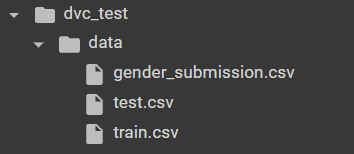
Let’s add dataset files to track them with DVC and to be able to use data versioning tools:
dvc add data/train.csv data/test.csv data/gender_submission.csv

As a result, we cached our train.csv, test.csv, and gender_submission.csv to appropriate files with .dvc format:
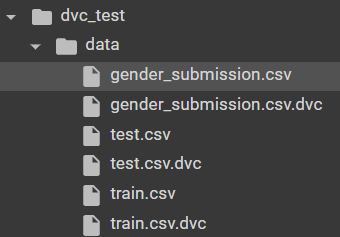
Now, let’s commit the changes we made:

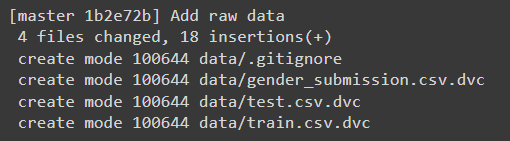
After doing this command, we can make sure that we have cached our dataset files and that, as a result, created .dvc files for every .csv file to make changes without affecting the repository and be able to make separate revisions that will be stored in these newly created files. Additionally, we must create remote storage to push our changes into it, so we did it with this command:
mkdir /tmp/dvcstore
dvc remote add -d myremote /tmp/dvcstore
In the first line, we made a folder for remote storage located in /tmp/dvcstore; then in the second line, we added this remote to the created folder. Now we can push our changes into created remote storage to store our latest revision:
dvc push

The experiment itself
Success! Let’s experiment with our cached files to introduce how data versioning works. For example, let’s delete dataset files and try pulling them from the remote. Firstly remove dataset files and cache folder:
rm -rf .dvc/cache
rm -f data/train.csv data/test.csv data/gender_submission.csv
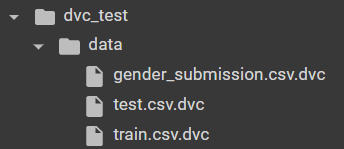
As we can see, now we have only .dvc filesthat contain cached dataset files, and let’s try to pull them:
dvc pull

The output says that we added 3 files that we deleted earlier, and as a result, we have the file tree we had earlier. So we can make all changes in our local file tree. If we corrupt it, we can just upload them back from remote storage, which we initialized earlier with a first commit containing data files:

Let’s try to make some changes to the dataset and revert them to their original state. For example, let’s extend the train.csv file by itself with this command:
cp data/train.csv /tmp/train.csv
cat /tmp/train.csv >> data/train.csv
Then add it:
dvc add data/train.csv
And push it to remote and make commit:

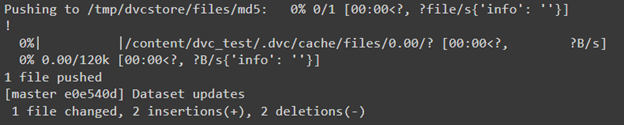
So, as we can see, we changed exactly 1 file, which was our train.csv. If the changes were made by accident, they could be reverted in such a way:


As a result, we have the original train file. And then, we can commit these revert changes:

Conclusion
The data versioning feature allows us to control dataset versions easily so that all changes can be separated as different revisions. Suppose some modification doesn’t suit us or doesn’t show itself well during model training. In that case, we can return to the previous version or make changes in the current version, so these interactions allow us to control this process with the help of DVC conveniently and make this process more comfortable and less time-consuming than without DVC.
Increasing data potential across industries with DVC
More and more Industries are using the power of data for innovations and better-informed decisions. Let’s see how the DVC tool helps them to revolutionize their data-centric workflows and reach outstanding results.
Healthcare. The healthcare industry can leverage this tool to manage comprehensive medical datasets, such as patient records and diagnostic images. DVC’s version control ensures precise tracking of changes, offering transparency and reproducibility crucial for research, clinical trials, and regulatory compliance. It allows healthcare professionals to collaboratively develop and refine machine learning models for disease diagnosis, drug discovery, and personalized treatment.
Fintech and Banking. DVC empowers this sector to navigate vast financial datasets while maintaining data integrity and security. It enhances version control for models predicting market trends, risk assessment, and fraud detection. DVC’s robust audit trail ensures accountability and assists in adhering to stringent financial regulations. Through streamlined collaboration, Fintech and banking teams can optimize algorithms, enhance trading strategies, and create user data-oriented financial products.
Insurtech. Here, DVC is a valuable instrument for managing diverse insurance-related data, from policyholder information to claims history. The tool’s data versioning capability supports precise tracking of changes in actuarial models, enabling accurate compensation calculations and risk assessment. DVC’s integration with machine learning significantly contributes to developing refined underwriting algorithms, enhancing customer experience and claims processing.
Retail and ECommerce. The instrument offers Retail and eCommerce businesses a structured approach to handling expansive product catalogs, customer behavior data, and marketing analytics. Enabling precise version control ensures accurate insights for demand forecasting, inventory management, and personalized recommendations. ECommerce platforms leverage DVC’s capabilities to optimize supply chain operations, enhance customer engagement, and elevate their competitive edge.
The transportation and logistics. The industry benefits from the tool’s ability to manage vast geospatial and operational data. DVC’s data versioning supports the development of advanced route optimization algorithms, improving fleet management and delivery efficiency. By tracking changes in sensor data and performance metrics, DVC enhances predictive maintenance strategies, reducing downtime and ensuring smooth logistics operations.
The Unidatalab team has diverse ML projects for various industries, leveraging different tools and frameworks for better workflows. Want to check it out? Let us know!
And don’t miss out on the second part of the experiment, where we’ll show you how to use DVC to handle the model training process.